PN-80TC3


Sharp delivers a breakthrough in capacitive touch-panel technology—the new PN-80TC3 interactive touchscreen with a featherlight touch. Using this interface is so intuitive and responsive that it feels like writing on a conventional whiteboard. The PN-80TC3 revolutionises the way you collaborate with colleagues or classmates. It allows you to display and freely annotate a huge variety of documents, with up to four people able to write onscreen at the same time. Now, whether in the boardroom or the classroom, you can share your message with more precision than ever.

Intuitive Input Experience
Simultaneous Writing for Up to 4 People
The PN-80TC3 lets you capture ideas at the moment of creation. Recognising up to 10 touch points, it allows up to four people to write at the same time with a finger or touch pen. Each pen boasts a thin 3.5 mm tip that makes it easier to add detailed notes that remain legible when printed out.
Note: Two touch pens are bundled with the PN-80TC3.


Featherlight Touch for Precise and Smooth Operation
Say goodbye to unintended input and writing errors. Thanks to the PN-80TC3’s precise position detection, only intentional input from fingers and touch pens appears on the display. Employing Sharp’s original capacitive touch technology—which achieves high sensitivity and precision by reducing the noise level to one-eighth that of conventional models—the PN-80TC3 eliminates unwanted noise to deliver a clear onscreen signal.


SHARP Touch Viewing Software
SHARP Touch Viewing Software* is a touch-operated onscreen user interface that lets you easily manipulate different types of files, including Microsoft® Office applications, videos, and web pages. Being able to simultaneously open and handle a variety of file types allows you to have more active meetings.
* Check with your local Sharp authorised dealer/representative for details on how to obtain this software.
SHARP Pen Software
A Fluid, Smart, and Responsive Interface
The new touch pen links with SHARP Pen Software to help you write with an uninterrupted flow. Furthermore, you can use the included eraser to delete unwanted content without switching functions—just as you would with a regular whiteboard.


Display, Write, and Share Information
In overlay mode, you can write onscreen annotations directly onto photos, videos, PDFs, and documents such as Microsoft®Excel®, Word, and PowerPoint®. Text and graphics written on the board can be stored in USB memory* or sent directly via e-mail to selected recipients.
Note: Documents displayed in the background of the board during overlay mode cannot be accessed directly.
* Saved as PDF, BMP, JPEG, or PNG files.
Handwriting Recognition
The PN-80TC3 features a handwriting recognition* function that converts selected onscreen handwriting into standard text. It can also automatically recognise and reproduce handwritten shapes such as circles, triangles, and squares. This convenient function makes it easy to utilise onscreen content to make a legible record of your meeting or lesson.
* Works with languages supported by SHARP Pen Software.
Presentation Support Tool
SHARP Pen Software links smoothly with the PowerPoint application. During slideshow presentations, you can perform various control operations, such as returning to a previous slide without using a right-click.
* Compatible applications: Microsoft PowerPoint 2007/2010/2013

Multi Board Function
Up to three PN-80TC3 units can be connected and used to display sequential pages that can be navigated by swiping side to side. With the Multi Board function*, meeting participants are better able to grasp the overall flow of a presentation.
* Requires a compatible version of SHARP Pen Software. Check with your local Sharp authorised dealer/representative for details. Only one PN-80TC3 unit can be operated at a time.
Smartly Designed for Easy Connectivity
Touch-Operated Onscreen Display
Pressing the Touch Menu button brings up an onscreen menu that lets you easily switch input sources, change volume level, or turn the touchscreen function on and off—all from the front of the PN-80TC3 and all without the need for a remote controller.

Frontside Access to USB Port
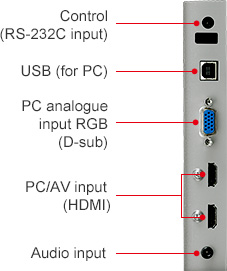
For increased convenience when the panel is mounted on a wall, the PN-80TC3 features a USB input on the front that connects to the set-top box on the back of the unit. Now there’s no need to reach around the back of the monitor when you want to connect a peripheral device.
Note: The set-top box is sold separately.

Installation of Web Cameras
The PN-80TC3 supports installation of a web camera in any one of seven positions*, giving you the flexibility to find the optimal set-up to match your room layout and seating arrangements.


* The camera mount cannot be attached in the bottom-centre position when the tray is attached. To attach the camera mount there, it is necessary to remove the tray mount fitting.
A Variety of Input and Output Terminals
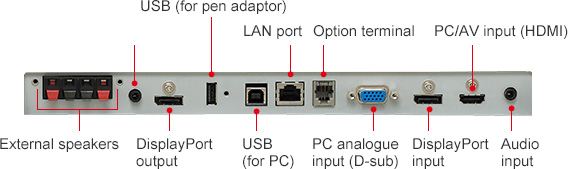
The PN-80TC3 comes standard-equipped with a wealth of input and output terminals—located on the side and bottom of the monitor—to enable easy connection with a wide variety of equipment.
MFP Connectivity
Documents and colour images scanned from a compatible Sharp MFP can be imported directly to the SHARP Pen Software for display on the PN-80TC3. For added convenience, image data shown onscreen—including notations—can be saved to a PC or sent directly to an MFP for printout.
Work Smarter with SHARP Display Connect
SHARP Display Connect*1 software supports effective and multifaceted communication. By enabling connection with mobile devices*2, SHARP Display Connect facilitates interactive presentations, lively discussions, and paperless meetings in both business and educational settings.
■ SHARP Display Connect enables the following interactive functions on the PN-80TC3 and mobile devices connected via wireless LAN:
▪ sharing of onscreen content
▪ transfer of files
▪ interactive onscreen writing and drawing
▪ remote control of the PN-80TC3 from mobile devices
■ Up to 50 mobile devices*1*3 can be connected simultaneously.
■ Files can be transferred between mobile devices even if they are not connected to the PN-80TC3.
■ Users can capture onscreen images and save them on their mobile devices to make personally annotated memos.
■ SHARP Display Connect also connects two BIG PAD on the same network (intranet, VPN, etc.) to enable larger-scale interactive communications.
■ LCD monitor:PN-80TC3 used with bundled software
CD-ROM: Max. 50
*1: The number of connectable mobile devices depends on the host OS and the accompanying Windows® End-User License Agreement:
Windows® 7: Max. 20; Windows® 8/8.1: Max. 50
*2: OS requirements (as of August 2015): Host: Windows® 7, Windows®8/8.1;
Client: Windows® 7, Windows® 8/8.1, OS X® 10.7–10.10, AndroidTM 2.3–5.0, iOS 6.0–8.0.
Please contact your local authorised Sharp dealer or representative for further details.
*3: Connecting 26 or more mobile devices requires at least two LAN access points.

Other Value-Adding Functions
▪ Multiple displays can be wall mounted together
▪ Safe design incorporating rounded corners
▪ Thin, lightweight, and fully flat screen
▪ Built-in speakers
▪ Anti-glare film to minimise reflections

Accessories
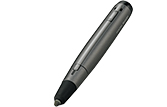
Touch Pen (PN-ZL03)
General
| Model | PN-80TC3 | |
|---|---|---|
| Installation | Landscape | |
| Installation | 80-inch widescreen (203.2 cm diagonal) UV2A*1 LCD | |
| Max. Resolution | 1,920 x 1,080 pixels | |
| Max. Display Colours (approx.) | 1.06 billion colours | |
| Pixel Pitch (H x V) | 0.923 x 0.923 mm | |
| Max. Brightness (average)*2 | 300 cd/m2 | |
| Contrast Ratio | 4,000 : 1 | |
| Viewing Angle (H/V) | 176°/176° (CR 10) | |
| Active Screen Area (W x H) (approx.) | 1,771.2 x 996.3 mm (69 3/4" x 39 1/4") | |
| Response Time | 4 ms (grey to grey, avg.) | |
| Backlight | LED, full array | |
| Touchscreen | Touch Technology | Capacitive touch technology |
| PC Connection Port | USB 2.0 (type B) x 2 | |
| Power Supply | Supplied from main unit | |
| Multi Touch | 10 points | |
| Protection Glass | Thickness: Approx. 3.8 mm*3 Shock resistance: 130 cm*4 | |
| Touch Pen | Communication | Wireless communication method (capacitive touch technology) |
| Function Button | Yes | |
| Computer Input | Video | Analogue RGB (0.7 Vp-p) [75Ω], DisplayPort 1.1a |
| Synchronisation | Horizontal/vertical separation (TTL: positive/negative), Sync on green (D-sub 15-pin only), Composite sync (TTL: positive/negative) | |
| Plug & Play | VESA DDC2B | |
| Power Management | VESA DPMS | |
| Video Colour System | NTSC (3.58 MHz, 4.43 MHz), PAL, PAL60, SECAM | |
| Input Terminals*5 | PC analogue: Mini D-sub 15-pin x 2*6, HDMI (HDCP and 1080p compatible, PC/AV signal compatible) x 3, 3.5 mm-diameter mini stereo jack x 2, Video x 1*6, Component video x 1*6, DisplayPort (HDCP compatible, PC signal compatible) x 1,RS-232C x 1*7*8 |
|
| Output Terminals*5 | 3.5 mm-diameter mini stereo jack x 1, DisplayPort (HDCP compatible) x 1 | |
| Input/Output Terminals*5 | LAN port (10Base-T/100Base-TX) x 1 | |
| Speaker Output | Built-in | 10 W + 10 W |
| External | 10 W + 10 W (6Ω) | |
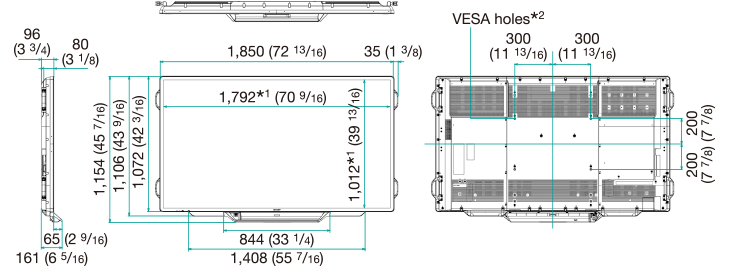
| Mounting | VESA (4 points), 600 x 400 mm pitch, M6 screw | |
| Power Supply | 100V – 240V AC, 50/60 Hz | |
| Power Consumption | 280 W | |
| Environmental Conditions | Operating Temperature | 5°C to 35°C |
| Operating Humidity | 20% to 80% RH (no condensation) | |
| Dimensions (W x D x H) (approx.) (display only) | 1,850 x 96 x 1,072 mm (72 13/16" x 3 3/4" x 42 3/16") | |
| Weight (approx.) | 77 kg (169.8 lbs) | |
| Main Accessories | AC power cord, remote control unit, battery (AA size) x 2, set-up manual, blank sticker, cable clamps x 7, camera mount, USB cable (3.0 m), USB extension cable (1.8 m), eraser, pen tray, touch pen (with function button) x 2, pen adaptor, touch pen battery (AAA size) x 2, SHARP Display Connect software CD-ROM, RS-232C conversion cable (3.5 mm-diameter mini stereo jack) x 1 |
|