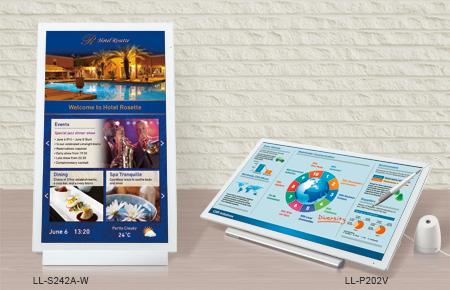
LL-P202V
Digitizer Functionality Boosts Communicative Potential
The LL-P202V is a 20-inch-class multi-touch LCD monitor with a digitizer function that lets you write directly on the display with the bundled digitizer pen. This monitor opens up a broad range of possible applications when used in concert with graphics software or with office software such as Microsoft® Word, Excel®, PowerPoint®, and Outlook®. The list of areas where the LL-P202V can add tangible value is almost limitless: in various business situations, in education, for proofreading, for CAD, in hospitality, in healthcare, and much more.
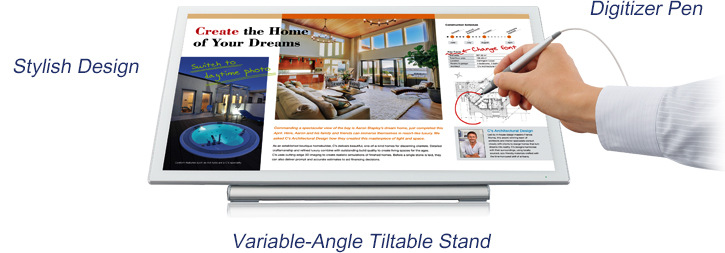
20-Inch-Class Full HD Touchscreen LCD
The LL-P202V employs a 20-inch-class capacitive touchcreen LCD with 10-point multi-touch functionality. This LCD provides extremely quick response for writing and touch gestures, while delivering full HD (1,920 × 1,080-pixel) resolution. It can also distinguish between pen input and hand input. When it detects the bundled digitizer pen, it prioritises pen input and cancels any input coming from hands or fingers.
Highly Sensitive Pen Input
Windows® 8.1 Compatible Digitizer Pen
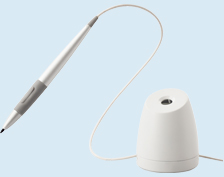
The bundled digitizer pen is ergonomically designed for an easy grip and comfortable writing. You can write text or draw illustrations smoothly with an uninterrupted flow, and you can select small onscreen objects and move them around. The pen supports a wide variety of usage situations, ranging from business to graphics applications, using software such as Microsoft Reader.
Pressure-Sensitive Writing
The digitizer pen is pressure sensitive, enabling you to write smoothly and naturally as if on a piece of paper. Signatures look authentic, while illustrations get a warm, organic texture. And the Palm Cancellation function prevents hand input from interfering with pen input, so you can rest your hand comfortably on the screen while writing.

Handwritten input / e-signatures
Shortcuts to Frequently Used Functions
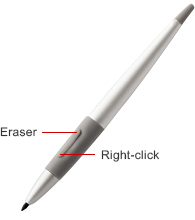
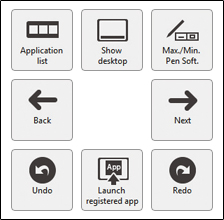
Functions that you need to use frequently, such as eraser and right-click*, can be assigned to a special function button on the pen. Functionality is activated by pressing the button while touching the screen with the pen tip. You can also take advantage of an onscreen shortcut launcher comprising eight shortcut icons* for frequently used functions that you can pre-assign. Simply click the function button as you hold the pen hovering over the screen to call up the shortcut launcher.
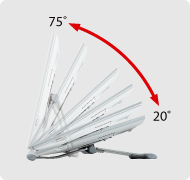
Stand Tilts at Variable Angles
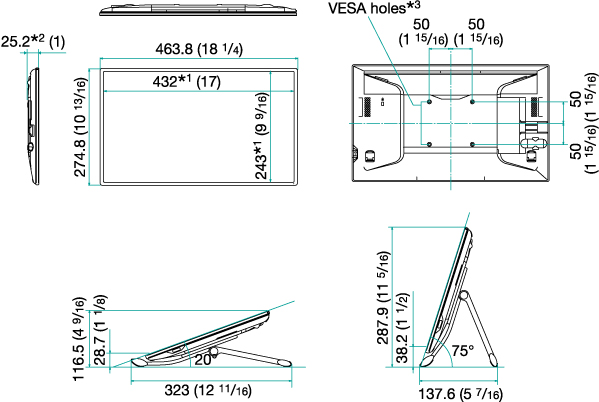
The LL-P202V comes with a stand that can be tilted at an angle ranging from 20 to 75 degrees. The monitor can be set up in whatever position you find most comfortable: the 20-degree angle is ideal for onscreen handwriting, whereas the 75-degree angle provides optimal viewing.
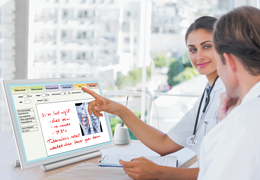
Medical services and consultations

Creative work
Collaboration with Larger Displays
The LL-P202V connects with Sharp’s interactive whiteboards and Sharp video walls for use in meetings, presentations, seminars, and lectures held in large venues. Content on the LL-P202V, including the presenter’s handwritten annotations, can be mirrored in real-time on the interactive whiteboard or video wall for all participants to see.

As a handy monitor for the presenter to show the same content on a video wall
Аccesories
General
| Model Name | LL-P202V | LL-S242A-W | |
|---|---|---|---|
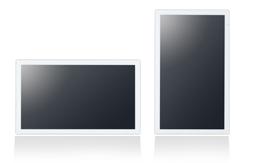
| Installation | Landscape / Portrait*1 | Landscape / Portrait | |
| LCD Panel | 20-inch-class (19 1/2-inch [49.5 cm] diagonal) TFT LCD |
24-inch-class (23 5/8-inch [60.0 cm] diagonal) TFT LCD |
|
| Max. Resolution | 1,920 x 1,080 pixels | ||
| Max. Display Colours (approx.) | 16.7 million colours | ||
| Pixel Pitch (H x V) | 0.225 x 0.225 mm | 0.272 x 0.272 mm | |
| Max. Brightness (average)*2 | 250 cd/m2 | ||
| Contrast Ratio (average) | 3,000 : 1 | 1,000 : 1 | |
| Viewing Angles (H/V) | 178°/178° (CR ≧ 10) | ||
| Active Screen Area (W x H) (approx.) | 432 x 243 mm (17″ x 9 9/16″) |
521.3 x 293.2 mm (20 1/2″ x 11 9/16″) |
|
| Response Time | 5 ms (grey to grey, avg.) | 14 ms (grey to grey, avg.) | |
| Backlight | LED, edge-lit | ||
| Touchscreen | Touch Technology | Capacitive touch | |
| Multi Touch | 10 points | ||
| Touch Pen | Type | Digitizer pen | Touch pen |
| Function Button | 2 | - | |
| Supported OS | Windows® 8.1, Windows® 8, Windows® 7, Windows Vista®*3 | ||
| Computer Input | Plug & Play | VESA DDC2B | |
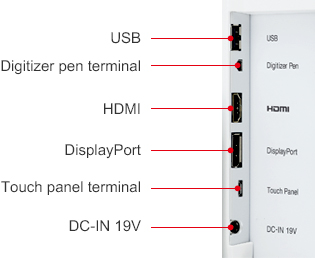
| Input Terminals | DisplayPort™ x 1, HDMI™/MHL™ x 1 | ||
| Input/Output Terminals | USB 2.0 (type A) x 1 | ||
| Built-in Speakers | 1 W + 1 W | ||
| Mounting | VESA (4 points), 100 x 100 mm pitch, M4 screw | ||
| Power Supply | 100V–240V AC, 50/60 Hz, DC 19 V | ||
| Power Consumption | 41 W (29 W*4) | 48 W (36 W*4) | |
| Environmental Conditions |
Operating Temperature | 0°C to 35°C | |
| Operating Humidity | 20% to 80% RH (no condensation) | ||
| Dimensions (W x D x H) (approx.) (display only) | 463.8 x 25.2 x 274.8 mm (18 1/4" x 1" x 10 13/16") |
566.4 x 28.7 x 338.3 mm (22 5/16" x 1 1/8" x 13 5/16") |
|
| Weight (approx.) (display only) | 2.3 kg (5.07 lbs) | 4.8 kg (10.58 lbs) | |
| Main Accessories | Digitizer pen, pen stand,variable-angle stand, USB-Micro USB cable (for touchscreen operation), power cord, AC adaptor, utility CD-ROM (Sharp Pen Software, user’s manual, etc.), warranty | Touch pen, fixed-angle stand (75 degrees), USB-Micro USB cable (for touchscreen operation), power cord, AC adaptor, utility CD-ROM (Sharp Pen Software, user’s manual, etc.), warranty | |