PN-A601

Brilliantly Bright and Visible
With its ultra-high brightness of 2,000 cd/m2, the PN-A601 performs beautifully as eye-catching digital signage in office complexes, hotels, public spaces, shop windows, and many other types of brightly lit interiors. And while the PN-A601 can give vivid display to superb-quality images even in sun-washed indoor settings, high contrast makes those brilliant images clearly visible from afar.
Note: The PN-A601 is intended for use in indoor environments. If the monitor is installed in a location exposed to excessive direct sunlight, such as a window front, consult your installer to determine if additional measures are required to reduce ultraviolet and infrared radiation and ambient temperature.

High Contrast and Superb Energy Efficiency
The PN-A601 owes much of its outstanding black levels, amazing contrast, and superb energy efficiency to local dimming of the LED backlight. Local dimming allows specific groups of LEDs to be independently dimmed or brightened for greater control of the darkness and brightness in different areas of the monitor, resulting in considerably reduced power consumption. That's why the PN-A601 can deliver significantly better contrast and brightness than conventional LCD monitors while using remarkably less power!
Local Dimming

Power Consumption Comparison

Breathtaking Image Quality
The PN-A601's exceptional image quality comes from Sharp's own industry-leading LCD technologies. Sharp UV2A* technology, incorporated into the 60-inch LCD panel, ensures highly efficient use of light from the backlight and prevents light leakage for the display of truly bright whites, amazingly vivid colours, and extremely deep blacks. And Sharp's full-array LED backlight, sporting LED elements evenly positioned across the entire panel, gives PN-A601 images remarkably uniform brightness. Even better, the PN-A601 boasts 1,920 (H) x 1,080 (V)-pixel full-HD resolution, ensuring that none of the detail or visual impact is lost. Thanks to full-HD resolution, everything from fine text to intricate graphics is stunningly crisp and clear.

Sharp Digital Signage Software (Option)
Sharp Digital Signage Software is a versatile management software package that provides total support for the creation, scheduling, distribution, and display of a wide range of content for the PN-A601.
Image Quality and Functions
Brightness Sensor
The Brightness Sensor* function ensures clear visibility by automatically adjusting backlight brightness to complement surrounding brightness levels. In dark surroundings, backlight brightness automatically lowers, providing optimal viewing and energy savings as well.

In dark surroundings

In bright surroundings
Dual Screen Display
Picture-in-Picture (PIP) mode allows an AV-sourced image to be displayed within a PC-sourced one (or vice versa), while Picture-by-Picture (PbyP) mode puts images from AV and PC sources side by side for split-screen viewing.
Picture-in-Picture (PIP) mode

Picture-by-Picture (PbyP) mode

Mirror Display Mode (Daisy Chain)
With Mirror Display mode*, the same image can be displayed on a daisy chain of PN-A601 monitors for the powerful impact of visual repetition.
* Requires DVI-D cable.

Enlarge (Zoom) Display Mode
Multiple monitors can be grouped together to display one enlarged image, thanks to Enlarge (Zoom) Display mode*, which corrects the framing of that image to eliminate misalignment between monitors.
* Used with PC and AV signal output on PN-A601.
User-friendly Design
Environmentally Friendly Design
The PN-A601 conforms to the RoHS Directive restricting the use of hazardous substances.
Choice of Installation Mode
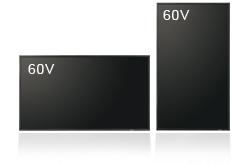
The PN-A601 offers a choice of landscape or portrait installation, allowing customers to select the mode that best suits their display content and application.
VESA-Compliant Mounts
VESA-compliant mounts provide right/left pivot and swivel, ensuring a high level of safety when the PN-A601 is mounted on a wall or suspended from a ceiling.
Carrying Handles for Safe Setup
To ensure safe handling, Sharp LCD monitors come with heavy-duty carrying handles*.
* Pre-assembled with main unit.
Reliability / Durability
24/7 Operation
The PN-A601 is rugged enough for continuous 24/7 operation* in demanding professional applications.
* Image persistence may occur when the same static image is continuously displayed for extended periods of time. Image persistence can be gradually removed by displaying a video or moving graphics.
Power on Delay
The Power on Delay function allows a time delay between the startup of each monitor in video walls or multi-monitor installations. This reduces the load placed on the power supply when a number of monitors are turned on at the same time.
Built-In Temperature Sensor
Should the temperature inside a monitor rise, a built-in sensor will detect it, and the backlight system will automatically adjust to keep the temperature within operational level*.
* The monitor automatically goes to standby mode when the internal temperature remains consistently above operational level.
Display Managment
ID Setting
Thanks to an RS-232C interface, the PN-A601 can be easily controlled and monitored from a central location via a PC. Each monitor can be assigned an individual ID code to specify when remotely turning that monitor on or off, changing its input, or making various screen adjustments and settings.

Scheduling
For total ease of operation, the Schedule function allows up to eight settings to be pre-programmed for automatic monitor turn on/off at precise times on a daily, weekly, or one-time basis.
Log Saving/Output
To boost the troubleshooting efficiency of service technicians, operating logs, signal changes, information on operating irregularities, and other such data can be saved and tracked.
Hardware Diagnostics
The Hardware Diagnostics function detects any irregularities in power supply voltage and indicates it on the monitor.
E-Mail Notification
With the E-Mail Notification* function, display status updates will be sent periodically to a specified e-mail address. A notice will also be sent if a malfunction occurs.
* Requires optional Interface Expansion Board.
Web Browser Setting
The PN-A601 can be easily operated through a Web browser and monitor control software*.
* Available separately
* Requires optional Interface Expansion Board.
SNMP Support
Display status, continuous operating time, and other parameters can be monitored over a local area network using Simple Network Management Protocol (SNMP)*.
* Requires optional Interface Expansion Board.
Self Adjust Function
With an analogue PC connection, when a change occurs to the input signal timing, the clock phase will automatically adjust accordingly.
Accessories
Control Kit (PN-ZR01)
The PN-ZR01 is composed of a remote control unit and a remote control sensor box. The sensor box can function as a supplementary brightness sensor.
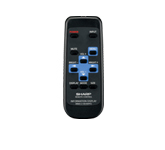
Remote control unit
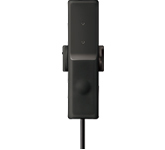
Remote control sensor box
Interface Expansion Board (PN-ZB01)
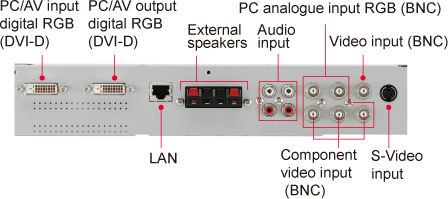
The expansion board adds DVI-D input/output, component video input, RJ-45 LAN display control, and more. You can also operate the display via a Web browser and monitor-control software*. What’s more, regular display status updates can be sent to a specified E-mail address, and operating parameters can be monitored over a LAN using SNMP (Simple Network Management Protocol).
* Separate hardware and software are required for each individual system build.
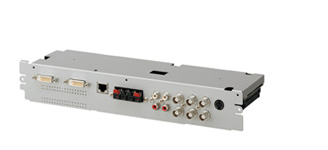
Crossflow Fan (PN-ZF01)*
A rise in surface temperature on the LCD monitor may hinder proper display. To prevent this from happening, the optional PN-ZF01 Crossflow Fan spreads a curtain of air across the monitor that keeps the temperature from rising.
* Availability depends on region.
General
| Model | PN-A601 | |
|---|---|---|
| Installation | Landscape/Portrait | |
| LCD Panel | 60-inch widescreen (152.5 cm diagonal), UV2A LCD | |
| Max. Resolution | 1,920 x 1,080 pixels | |
| Max. Display Colours (approx.) | 1.06 billion colours | |
| Pixel Pitch (H x V) | 0.692 x 0.692 mm | |
| Brightness*1 | 2,000 cd/m2 | |
| Contrast Ratio | 1,000,000 : 1 (local dimming set to HIGH) 5,000 : 1 (without local dimming) |
|
| Viewing Angle (H/V) | 176°/176° (CR ≥ 10) | |
| Active Screen Area (W x H) | 1,329.1 x 747.6 mm (52 10/32" x 29 14/32") | |
| Response Time | 6 ms (grey to grey, avg.) | |
| Computer Input | Video | Analogue RGB (0.7 Vp-p) [75 Ω], Digital (conforms to DVI 1.0 standards) |
| Synchronisation | Horizontal/vertical separation (TTL: positive/negative) Sync-on-green, Composite sync (TTL: positive/negative) |
|
| Plug & Play | VESA DDC2B | |
| Power Management | VESA DPMS, DVI DMPM | |
| Video Colour System | NTSC (3.58 MHz, 4.43 MHz)*2 / PAL / PAL60 / SECAM | |
| Input Terminals*3 |
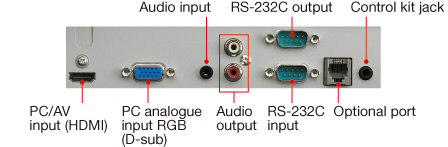
Standard | PC analogue: Mini D-sub 15-pin x 1*4, HDMI (1080p compatible) x 1*5, 3.5 mm-diameter mini stereo jack x 1, Video*4*6, Component video*4*6, RS-232C: D-sub 9-pin x 1, Control Kit jack x 1 |
| Via Optional PN-ZB01 Board | PC digital: DVI-D 24-pin (HDCP compatible) x 1, PC analogue: BNC x 1*7*8*9, Video: BNC x 1*6, S-Video x 1, Component video: BNC (Y, Cb/Pb, Cr/Pr) x 1*6*7, Audio: RCA pin (L/R) x 2: | |
| Output Terminals*3 |
Standard | Audio: RCA pin (L/R) x 1, RS-232C: D-sub 9-pin x 1 |
| Via Optional PN-ZB01 Board | PC digital: DVI-D 24-pin x 1, External speaker: 10W + 10W (6 Ω) | |
| Input/Output Terminals*3 |
Via Optional PN-ZB01 Board | LAN port (10Base-T/100Base-TX) |
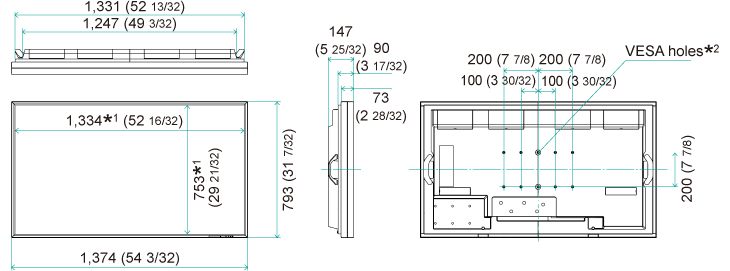
| Mounting | VESA (6 points), 200 mm (7 7/8") pitch, M6 screw or VESA (4 points), 200 mm (7 7/8") pitch, M6 screw |
|
| Power Supply | 100V – 240V AC, 50/60 Hz | |
| Power Consumption | 620W | |
| Environmental Conditions |
Operating Temperature | 0°C to 40°C |
| Operating Humidity | 20% to 80% RH (no condensation) | |
| Dimensions (W x D x H) (approx.) | 1,374 x 147 x 793 mm (54 3/32" x 5 25/32" x 31 7/32") (Display section only, not including protrusions) |
|
| Weight (not including PN-ZB01) (approx.) | 45 kg (99.2 lbs) | |