PN-70TA3

Share Your Ideas with
Ease and Finesse
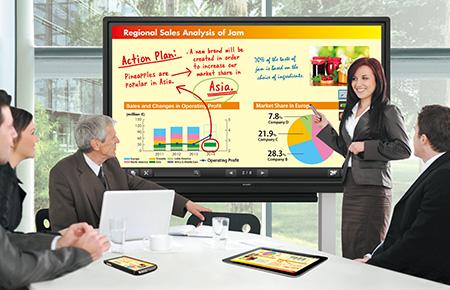
Sharp's BIG PAD PN-70TA3/70TB3/60TA3/60TB3 are designed for smooth and effortless communication in a wide range of contexts. Their highly responsive touch pens allow several people to write on the same screen at the same time. And SHARP Display Connect software enables multifaceted wireless communication. Whether in the boardroom or the classroom, Sharp changes the way you communicate.

Simple, Intuitive Operation Lets You Focus on Interacting
Simultaneous Writing
Recognising up to 10 points of contact, the PN-70TA3/70TB3 and PN-60TA3/60TB3 multi-touch LCD monitors allow up to four people to write on the screen at the same time using touch pens or fingers. Participants can take an active part in meetings, brainstorming sessions, classroom interactions, and more. Discussions and presentations become platforms for effective and lively exchanges of opinions.

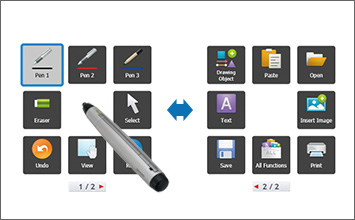
User-Friendly SHARP Pen Software
Using a touch pen, you can easily launch and display the SHARP Pen Software user interface—a menu comprising smartly arranged icons that provide easy access to pen settings and functions. Each touch pen has its own dedicated menu, which can be displayed even when up to four people are writing on the screen at the same time. Pen settings such as colour and line thickness can be set for each touch pen (with function buttons).
Smooth, Highly Responsive Touch Pen
The dedicated touch pen with function buttons*1 is so smooth and light that using it is like writing on paper. A pressure sensor at the tip of this slim and lightweight pen lets you write with high precision and with an effortless and uninterrupted flow.
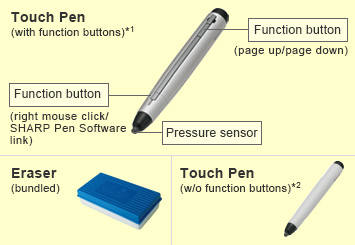
*1:Bundled with PN-70TA3/60TA3; optional for PN-70TB3/60TB3
*2:Bundled with PN-70TB3/60TB3
Handwriting Recognition
These LCD monitors feature a handwriting recognition*3function for converting selected onscreen handwriting into standard text. This convenient function allows you to utilise onscreen content to make neat and legible minutes of your meetings.
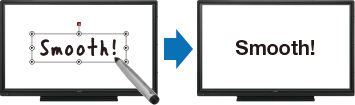
*3:Works with languages supported by SHARP Pen Software.
Designed with True User-Friendliness in Mind
Quick Startup (PN-70TA3/60TA3)
The whiteboard function on the PN-70TA3/60TA3 can start up quickly at a press of the power button, so that meetings get underway without delay.
Note: When booting the LCD monitor from power off status (power turned off using the power button on the monitor or remote control)
Front-Mounted Speakers
Two speakers (10W + 10W) are mounted low on the front of the LCD monitor to deliver clearer sound.
A Wealth of Input/Output Terminals
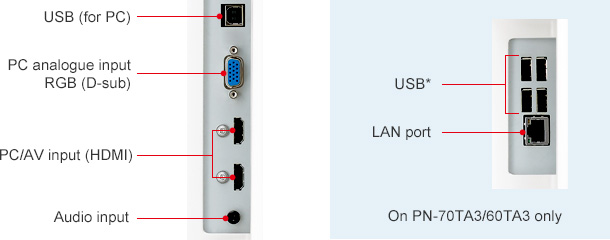
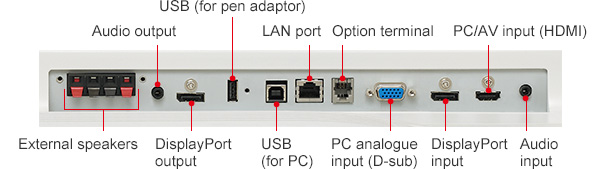
The PN-70TA3/70TB3 and PN-60TA3/60TB3 come standard-equipped with a wealth of input/output terminals—on the side and the bottom of the monitor—to enable easy connection with a wide variety of equipment. This array of terminals includes three HDMI ports, two D-sub ports, two DisplayPort™ terminals (one input, one output), and two touchscreen-supporting USB ports. One of the USB ports can be assigned to a regularly connected PC, such as a host PC used to operate the LCD monitor. The other USB port facilitates temporary connection to another PC, such as one used by a meeting participant. This allows easy PC connection without the need to switch the USB cable.
Minimise Glare and Fingerprints
Protecting the screen is an anti-glare film that works to reduce glare and reflections and minimise fingerprint soiling on the glass.
Touch-Operated Onscreen Display
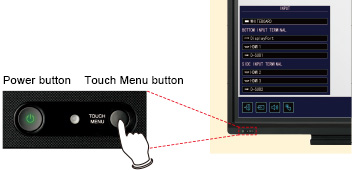
Pressing the Touch Menu button displays an onscreen menu that lets you easily switch input sources, change volume level, or turn the touchscreen function on and off without using a remote controller.
MFP Connectivity
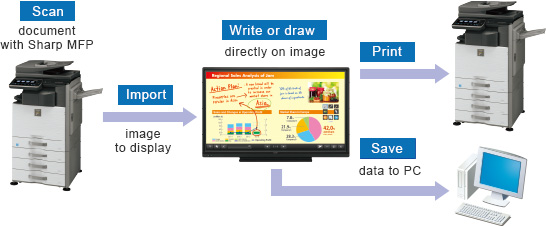
Documents and images scanned from a colour-scan-capable Sharp MFP can be imported directly to the SHARP Pen Software for display on the BIG PAD. For added convenience, image data shown onscreen—including notations—can be saved to a PC or sent directly to an MFP for printout.
Work Smarter with SHARP Display Connect
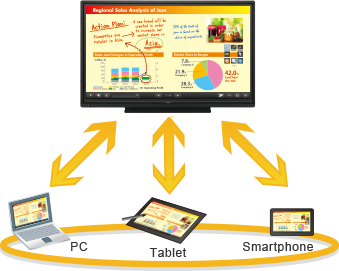
SHARP Display Connect*1 software supports effective and multifaceted communication. Onscreen content—including handwritten notes and drawings made in real time—can be viewed simultaneously on the BIG PAD and mobile devices*2such as PCs, tablets, and smartphones. SHARP Display Connect facilitates interactive presentations, lively discussions, and paperless meetings in both business and educational settings.
■ SHARP Display Connect enables the following interactive functions on BIG PAD and mobile devices connected via wireless LAN:
▪ sharing of onscreen content
▪ transfer of files
▪ interactive onscreen writing and drawing
▪ remote control of the BIG PAD from mobile devices
■ Up to 50 mobile devices*1*3 can be connected simultaneously.
■ Files can be exchanged between mobile devices even if they are not connected to the BIG PAD.
■ Users can capture onscreen images and save them on their mobile devices to make personally annotated memos (personal memo).
■ SHARP Display Connect also connects two BIG PAD on the same network (intranet, VPN, etc.) to enable larger-scale interactive communications.
*1:Number of connectable mobile devices depends on the following conditions.
▪ LCD monitors
PN-70TA3/60TA3 used with pre-installed software: Max. 20
PN-70TA3/60TA3/70TB3/60TB3 used with bundled software CD-ROM: Max. 50
▪ OS — Windows® 7: Max. 20; Windows® 8/8.1: Max. 50
*2:OS requirements:
PCs: Windows® 7, Windows® 8/8.1; Tablets: Windows® 7, Windows® 8/8.1, Android, iOS;
Smartphones: Android, iOS
*3:Connecting 20 or more mobile devices requires at least two LAN access points.
Feature Comparison
| PN-70TA3/PN-60TA3 | PN-70TB3/PN-60TB3 | ||
|---|---|---|---|
| Quick Startup | ● | - | |
| SHARP Pen Software*1 | ● (pre-installed) |
▲ (bundled; user installed) |
|
| Touch Pen | with function buttons |
● (1 pen/adaptor set) |
▲*2 (optionally available) |
| w/o function buttons |
- | ● (1 pen) |
|
| SHARP Display Connect*3 | ● (pre-installed / bundled; user installed) |
▲ (bundled; user installed) |
|
▲ feature available under conditions indicated in parentheses.
*1:Supports 11 languages (English, German, Spanish, French, Italian, Dutch, Portuguese, Russian, simplified Chinese, traditional Chinese, Japanese)
*2:Please check with your local authorised Sharp dealer/representative on availability.
*3:For details, see the section on SHARP Display Connect.
Accessories
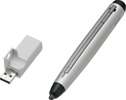
Touch Pen and Touch Pen Adaptor (PN-ZL01)
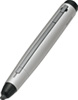
Touch Pen (PN-ZL02)
General
| Model Name | PN-70TA3 | PN-70TB3 | PN-60TA3 | PN-60TB3 | |
|---|---|---|---|---|---|
| Installation | Landscape | ||||
| LCD Panel | 70-inch-class (69 1/2-inch [176.6 cm] diagonal) UV2A*1 LCD | 60-inch-class (60 1/16-inch [152.5 cm] diagonal) UV2A*1 LCD | |||
| Max. Resolution | 1,920 x 1,080 pixels | ||||
| Max. Display Colours (approx.) | 1.06 billion colours | ||||
| Pixel Pitch (H x V) | 0.802 x 0.802 mm | 0.692 x 0.692 mm | |||
| Max. Brightness (average)*2 | 300 cd/m2 | ||||
| Contrast Ratio | 3,000 : 1 | ||||
| Viewing Angle (H/V) | 160°/160° (CR ≧ 10) | ||||
| Active Screen Area (W x H) (approx.) |
1,538.9 x 865.6 mm (60 9/16" x 34 1/16") |
1,329.1 x 747.6 mm (52 5/16" x 29 7/16") |
|||
| Response Time | 6 ms (grey to grey, avg.) | ||||
| Backlight | LED, edge lit | ||||
| Touchscreen | Touch Technology | IR (infrared blocking detection method) | |||
| PC Connection Port | USB 2.0 (type B) x 2 | ||||
| Power Supply | Supplied from main unit | ||||
| Multi Touch | 10 points | ||||
| Protection Glass | Thickness: Approx. 3.4 mm*3 Shock resistance: 130 cm*4 |
Thickness: Approx. 3.0 mm*3 Shock resistance: 130 cm*4 |
|||
| Touch Pen | Communication | Wireless communication method | - | Wireless communication method | - |
| Function Button | Yes | No | Yes | No | |
| Whiteboard Function | Built-in | - | Built-in | - | |
| Computer Input | Video | Analogue RGB (0.7 Vp-p) [75Ω], DisplayPort 1.1a | |||
| Synchronisation | Horizontal/vertical separation (TTL: positive/negative), Sync on green (D-sub 15-pin only), Composite sync (TTL: positive/negative) |
||||
| Plug & Play | VESA DDC2B | ||||
| Power Management | VESA DPMS | ||||
| Video Colour System | NTSC (3.58 MHz, 4.43 MHz), PAL, PAL60, SECAM | ||||
| Input Terminals*5 | PC analogue: Mini D-sub 15-pin x 2*6, HDMI (HDCP and 1080p compatible, PC/AV signal compatible) x 3, 3.5 mm-diameter mini stereo jack x 2, Video x 1*6, Component video x 1*6,DisplayPort (HDCP compatible, PC signal compatible) x 1 |
||||
| Output Terminals*5 | 3.5 mm-diameter mini stereo jack x 1, DisplayPort (HDCP compatible) x 1 | ||||
| Input/Output Terminals*5 | LAN port (10Base-T/100Base-TX) x 1 | ||||
| Controller*5 | USB | Type A x 4*7 | - | Type A x 4*7 | - |
| LAN port | 10Base-T /100Base-TX /1000Base-T x 1 |
- | 10Base-T /100Base-TX /1000Base-T x 1 |
- | |
| Speaker Output | Built-in | 10 W + 10 W | |||
| External | 10 W + 10 W (6Ω) | ||||
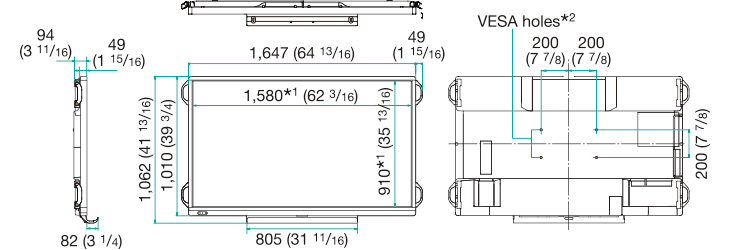
| Mounting | VESA (4 points), 400 x 200 mm pitch, M6 screw | ||||
| Power Supply | 100V – 240V AC, 50/60 Hz | ||||
| Power Consumption | 250 W | 225 W | 210 W | 185 W | |
| Environmental Conditions |
Operating Temperature | 5℃ to 35℃ | |||
| Operating Humidity | 20% to 80% RH (no condensation) | ||||
| Dimensions (W x D x H) (approx.) (display only) |
1,647 x 94 x 1,010 mm (64 13/16" x 3 11/16" x 39 3/4") |
1,437 x 94 x 890 mm (56 9/16" x 3 11/16" x 35") |
|||
| Weight (approx.) | 61 kg (134.5 lbs) | 59 kg (130.1 lbs) | 48 kg (105.9 lbs) | 46 kg (101.5 lbs) | |
| Main Accessories | AC power cord, remote control unit, batteries (AA size x 2), set-up manual, blank sticker, cable clamps x 5, camera mount, USB cable (3.0 m), eraser, pen tray | ||||
| Touch pen (with function button), pen adaptor, touch pen battery (AAA size), SHARP Display Connect software CD-ROM | Touch pen (without function button), SHARP Display Connect software CD-ROM | Touch pen (with function button), pen adaptor, touch pen battery (AAA size), SHARP Display Connect software CD-ROM | Touch pen (without function button), SHARP Display Connect software CD-ROM | ||